MoaV Client
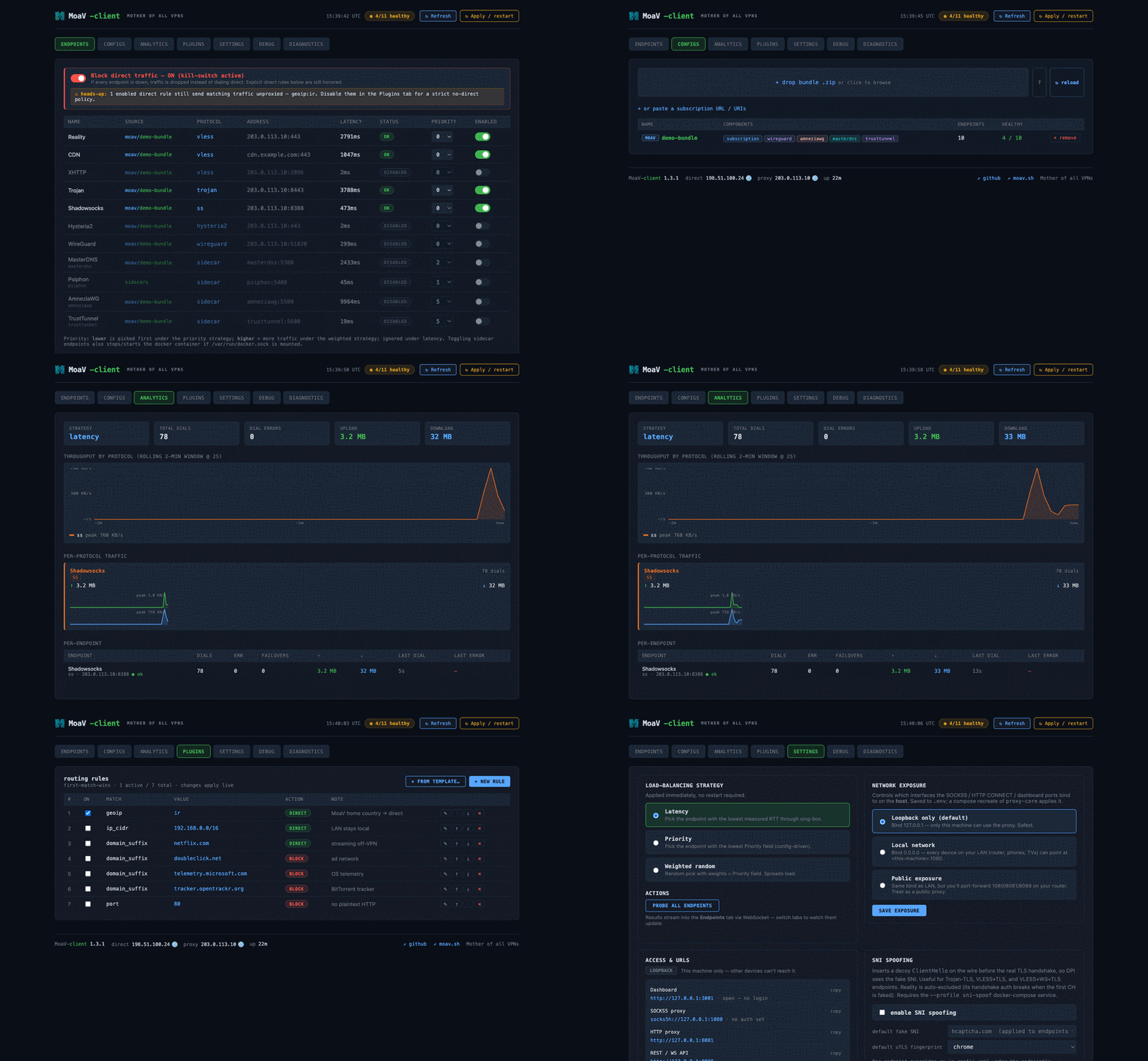
moav-client is a standalone, self-hosted client for MoaV servers. You run it on your own Linux box, home server, or desktop; it ingests a MoaV subscription bundle, probes every endpoint end-to-end through its tunnel, load-balances across the healthy ones, and exposes a single local SOCKS5 / HTTP CONNECT proxy for the rest of your machine to use. A dark React dashboard — styled to match the MoaV admin panel — gives live visibility into endpoint health, per-protocol throughput, routing rules, and logs.
How this differs from a connect-and-go app
Phone/desktop apps like Hiddify, NekoBox, sing-box, or Shadowrocket are the simplest way to connect a single device. moav-client is for when you want an always-on local proxy that automatically picks the best live endpoint, fails over when one dies, and gives you a dashboard + routing rules — e.g. on a home server or Linux desktop that other devices route through. To simply test whether a server's protocols work — on the server itself or in CI — use the lightweight MoaV Client Container instead.
Install
One command installs Docker (if missing), clones the repo, lets you pick which sidecars to build, seeds config, and brings the stack up:
It works interactively — even piped through bash — or fully headless, and installs a global moavc command.
Once it finishes, these are exposed on the local machine:
| What | Address |
|---|---|
| Dashboard | http://localhost:3001 |
| SOCKS5 proxy | socks5h://localhost:1080 |
| HTTP CONNECT | http://localhost:8081 |
| REST + WS API | http://localhost:8088 |
Point your browser or system proxy at socks5h://localhost:1080 — every connection then routes through the healthiest MoaV endpoint.
Manage it with moavc
moavc status                # service status + health + URLs
moavc info                  # just the dashboard / proxy / API URLs
moavc logs -f proxy-core    # tail logs
moavc probe                 # trigger a latency probe
moavc sidecar add tor       # enable + build + start a sidecar
moavc expose lan            # network reach: loopback | lan | public
moavc update [-b <branch>]  # pull (optionally switch branch) + rebuild
moavc uninstall [--wipe]    # remove the stack (--wipe deletes config/data)
The dashboard
The web UI at :3001 is organized into tabs:
- Endpoints — live status and latency per endpoint; toggle each on/off (sidecar toggles also stop/start its Docker container) and edit priority inline.
- Configs — import another MoaV server's bundle by dropping its
.zip; list, remove, and reload sources. - Analytics — per-protocol upload/download with a rolling 2-minute throughput chart, plus a per-endpoint table of dials, errors, and failovers.
- Plugins — first-match-wins routing rules (proxy / direct / block by domain, IP CIDR, GeoIP, port…), editable live from a curated template catalog.
- Settings — load-balancing strategy (latency / priority / weighted), network exposure, access URLs, SNI-spoofing, and config backup / restore.
- Debug / Diagnostics — streaming log tail and per-endpoint connectivity checks (TCP / DNS / traceroute, optionally through a chosen tunnel).
Network exposure
By default the proxy binds to loopback only. Widen it from the Settings tab or the CLI:
moavc expose loopback   # 127.0.0.1 — only this machine (default, safest)
moavc expose lan        # 0.0.0.0 — every device on your LAN can use it
moavc expose public     # LAN bind + you port-forward on your router
lan and public add optional SOCKS5 and dashboard authentication.
Supported protocols
Protocol cryptography is delegated to sing-box (and xray for XHTTP), with optional sidecars for the rest:
VLESS / Reality · VLESS+WS+TLS (CDN) · Trojan · AnyTLS · Shadowsocks-2022 · Hysteria2 · VLESS+XHTTP+Reality · WireGuard · AmneziaWG · TrustTunnel · MasterDNS · Psiphon · Tor.
See the Supported Protocols reference for what each one is and when to use it.
Learn more
Full documentation — configuration reference, architecture, plugin rules, and per-protocol dial details — lives in the repo:
- The moav:// bundle — the compact subscription the client imports.
- Repository: github.com/MotherofallVPNs/moav-client
- README: install, config, and CLI reference (available in English and فارسی)